

Updated March 26, 2026
TL;DR: Reference specifications for Apple Wallet and Google Wallet pass images.
- Apple: PNG only, provide highest resolution version
- Google: PNG preferred, single high-resolution version
- Google logo is auto-masked to circle — 15% safety margin required
- Keep total pass size under 1-3 MB for fast downloads
Overview
This reference provides exact image specifications for Apple Wallet and Google Wallet passes. Use these specifications when creating assets. For design philosophy and strategy, see the platform guides.
Apple Wallet Image Specifications
File Format Requirements
| Requirement | Specification |
|---|---|
| Format | PNG only (.png) |
| Color Profile | sRGB recommended |
| Transparency | Supported |
Icon Image (Recommended)
The icon appears on the lock screen and in system notifications.
| Image | Dimensions (px) |
|---|---|
| icon.png | 87 × 87 |
Supported by: All pass types
Logo Image
The logo appears in the header area of the pass.
| Image | Dimensions (px) |
|---|---|
| logo.png | 480 × 150 (max) |
Supported by: All pass types
- Logo can be rectangular or square
- Images are scaled to fit, preserving aspect ratio
- Logo should typically be narrower than maximum width
Strip Image
The strip is a full-width banner displayed on the pass front.
| Pass Type | Recommended (px) |
|---|---|
| Event Ticket | 1125 × 294 |
| Coupon / Gift Card | 1125 × 432 |
| Loyalty | 1125 × 369 |
Supported by: Coupon, Event Ticket, Loyalty
- Not displayed on Apple Watch
- Recommended to provide 1125px wide version
Thumbnail Image
A small image displayed next to the fields on the pass front.
| Image | Dimensions (px) |
|---|---|
| thumbnail.png | 270 × 270 (max) |
Supported by: Event Ticket, Access Control
- Aspect ratio should be 2:3 to 3:2 (outside this range, image is cropped)
- Not displayed on Apple Watch
Background Image
A blurred full-screen background behind the pass content.
| Image | Dimensions (px) |
|---|---|
| background.png | 540 × 660 |
Supported by: Event Ticket only
- Image is cropped and heavily blurred
- Can provide smaller size since blur hides details
- Cannot be used with strip or thumbnail on Event Tickets
Pass Type Image Support Matrix
| Image | Coupon | Event Ticket | Access Control | Loyalty |
|---|---|---|---|---|
| Icon | Recommended | Recommended | Recommended | Recommended |
| Logo | Yes | Yes | Yes | Yes |
| Strip | Yes | Yes* | No | Yes |
| Thumbnail | No | Yes* | Yes | No |
| Background | No | Yes* | No | No |
*Event Ticket: If using strip image, do not use background or thumbnail.
Advanced Event Tickets
iOS 18 introduced poster-style event tickets with additional image requirements.
| Image | Dimensions (px) | Notes |
|---|---|---|
| Artwork | 1074 × 1344 | Full canvas size |
| Primary Logo | Standard logo specs | Header area |
| Secondary Logo | Optional | Additional branding |
Layout considerations:
- Top portion has black gradient overlay (system date/location)
- Bottom 360px covered by seat information
- Place critical branding in visible center area
Requirements:
- NFC-enabled passes only
- Enable "Advanced Event Ticket" in pass template settings
- Backwards-compatible (older iOS shows standard layout)
Apple Wallet File Size Guidelines
| Metric | Recommendation |
|---|---|
| Individual image | Under 200 KB |
| Total pass package | Under 1 MB ideal, 3 MB maximum |
Google Wallet Image Specifications
File Format Requirements
| Requirement | Specification |
|---|---|
| Format | PNG preferred, JPG accepted |
| Color Profile | sRGB recommended |
Logo Image (Required)
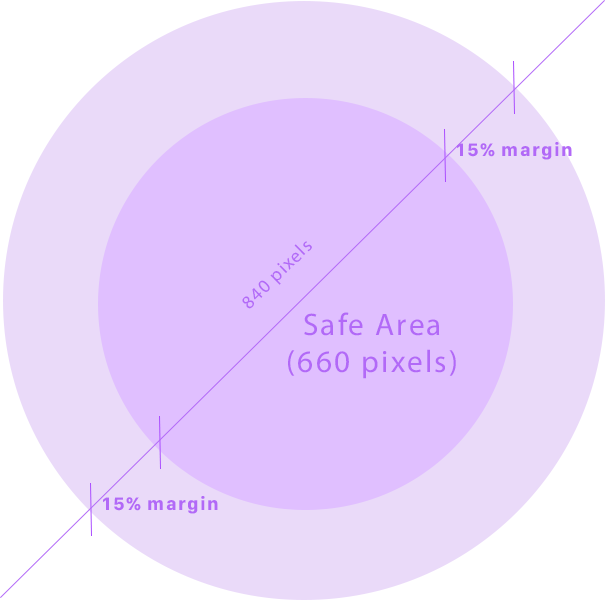
Google Wallet automatically masks logos into a circle.
| Specification | Value |
|---|---|
| Minimum Size | 660 × 660 px |
| Maximum Size | 840 × 840 px |
| Aspect Ratio | 1:1 (square) |
| Safety Margin | 15% from edges |
| Background | Full bleed color recommended |
Critical: Keep all important content within the inner 70% circle. Google auto-crops to circle shape.
Hero Image
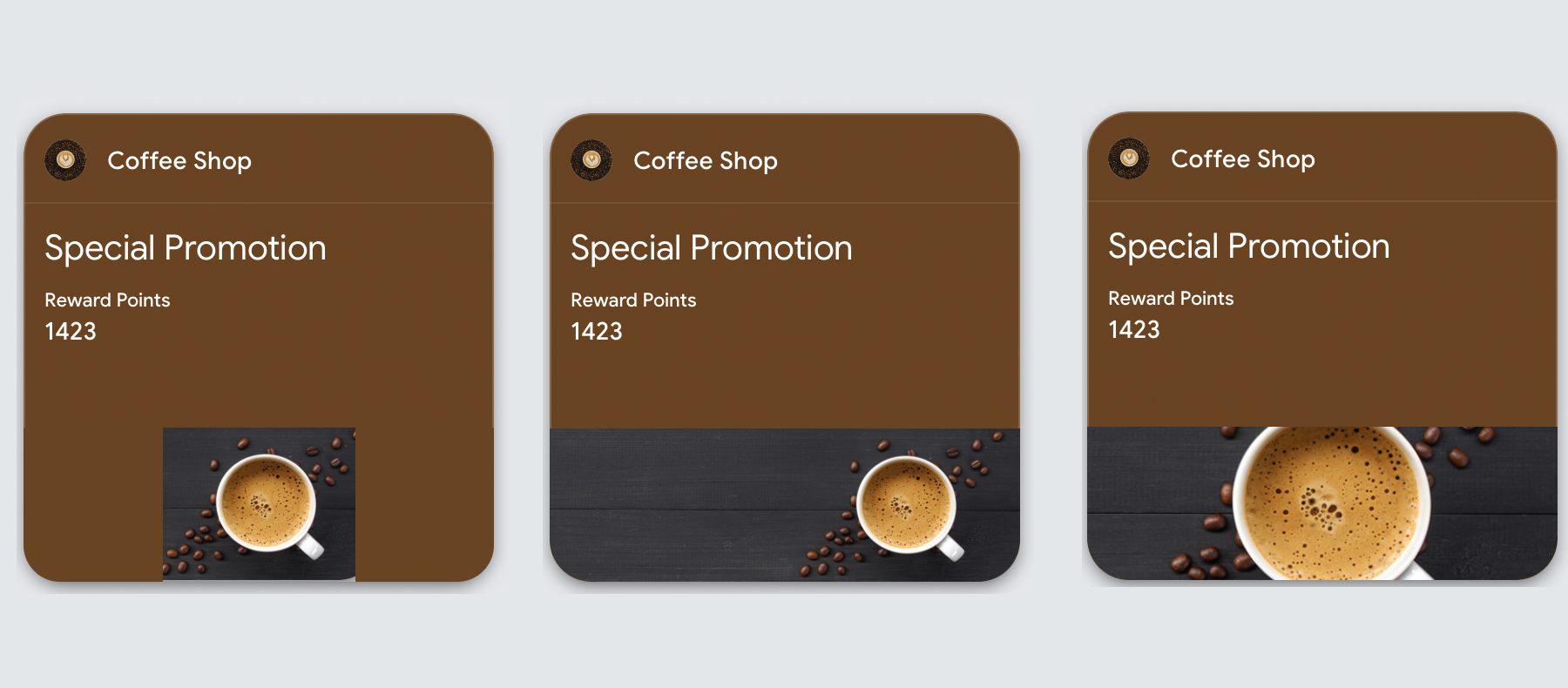
A full-width banner displayed across the pass body.
| Specification | Value |
|---|---|
| Recommended Size | 1032 × 336 px |
| Alternative Size | 1125 × 432 px (cross-platform) |
| Aspect Ratio | 3:1 or wider |
| Edge Buffer | 60px from edges for critical content |
Image may be cropped or scaled depending on device. Avoid text in images. Design for proportional scaling.
Full-Width Module Image
Images displayed in the pass details section.
| Specification | Value |
|---|---|
| Minimum Width | 1860 px |
| Height | Variable (proportional) |
| Background | Colored background recommended |
Google Wallet Pass Type Image Support
| Image | Access Control | Loyalty | Event Ticket | Offer |
|---|---|---|---|---|
| Logo (square) | Required | Required | Required | Required |
| Wide Logo | Yes | Yes | Yes | Yes |
| Hero Image | Yes | Yes | Yes | Yes |
| Full-width | Yes | Yes | Yes | Yes |
| Barcode images | Yes | Yes | Yes | Yes |
Cross-Platform Recommendations
When designing for both platforms simultaneously:
| Asset | Apple Wallet | Google Wallet | Cross-Platform |
|---|---|---|---|
| Logo | 480 × 150 px | 660 × 660 px | Provide both formats |
| Banner/Hero | 1125 × 432 px (strip) | 1032 × 336 px | Use 1125 × 432 px |
| Icon | 87 × 87 px | N/A | Apple only |
Common Mistakes
Apple Wallet:
- Using strip + background on Event Tickets (invalid combination)
- Images with embedded text (doesn't scale)
Google Wallet:
- Pre-masking logo to circle (Google does this automatically)
- Critical content in outer 15% of logo (gets cropped)
- Hosting images on HTTP instead of HTTPS
- Text in hero images (inconsistent rendering)
Both Platforms:
- Oversized images slowing downloads
- Relying on images for essential information
- Not testing on actual devices
Sources
More articles in Technical Reference
This reference covers barcode formats and NFC specifications for wallet passes. Both platforms su...
Color SpecificationsThis reference covers color configuration for Apple Wallet and Google Wallet passes. The platform...
Field Limits by PlatformThis reference provides field limits and character constraints for Apple Wallet and Google Wallet...